

Top Buzz Trends
No Result
View All Result
  • Entertainment
  • Business
  • Gaming
  • Tech
  • Crypto
  • More
    • Netflix
    • Prime Video
    • Max
    • Celebrity News
    • Movies
    • TV Shows
    • Paramount+
    • Disney+
    • Hulu
    • Apple TV
    • Google TV
    • Politics
    • Sports
  • Entertainment
  • Business
  • Gaming
  • Tech
  • Crypto
  • More
    • Netflix
    • Prime Video
    • Max
    • Celebrity News
    • Movies
    • TV Shows
    • Paramount+
    • Disney+
    • Hulu
    • Apple TV
    • Google TV
    • Politics
    • Sports
No Result
View All Result
Top Buzz Trends
  • Entertainment
  • Business
  • Gaming
  • Tech
  • Crypto
  • More
Home Tech

The Step-by-Step Guide to Setting Reminders on Your Android Phone for Notifications

by Editorial Team
September 7, 2023
in Tech
Reading Time: 3 mins read
0


How to Set Reminders for Notifications on Your Android Phone

How to Set Reminders for Notifications on Your Android Phone

Smartphones often inundate us with constant notifications, making it easy to miss important ones. However, Android offers a convenient feature that allows you to set reminders for notifications. This built-in feature can be handy whether you own a Samsung Galaxy, Google Pixel, or any other Android phone.

Enabling Notification Snoozing

First, you must ensure the notification snoozing feature is enabled on your Android device. This feature allows you to receive reminders for notifications at a later time. Here’s how to enable it:

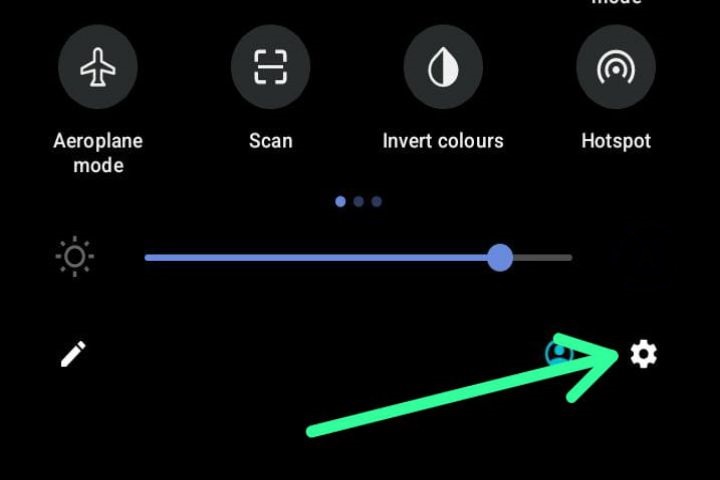
  • Swipe down once or twice from the top of your screen to access the notification panel.
  • Tap on the gear icon located in the top corner to access the settings menu.
The Step-by-Step Guide to Setting Reminders on Your Android Phone for Notifications

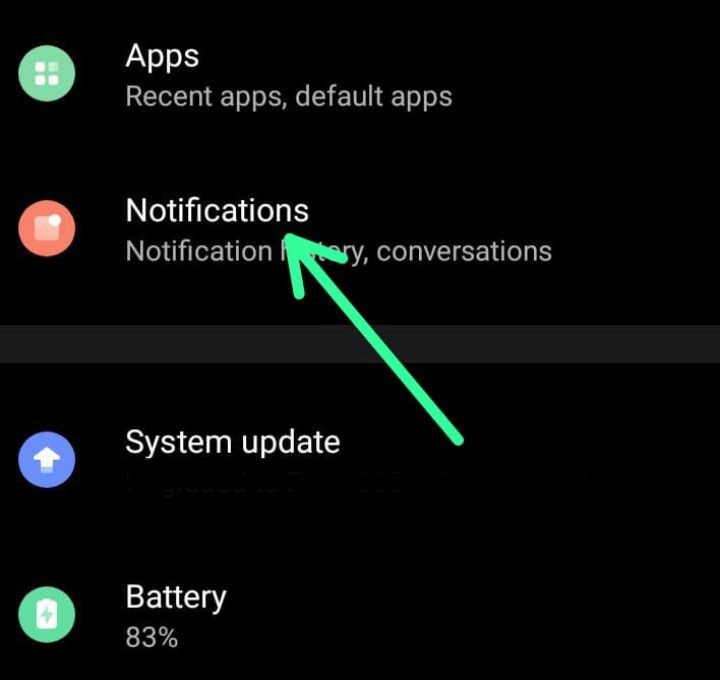
  • Scroll down and find the “Notifications” section.
The Step-by-Step Guide to Setting Reminders on Your Android Phone for Notifications

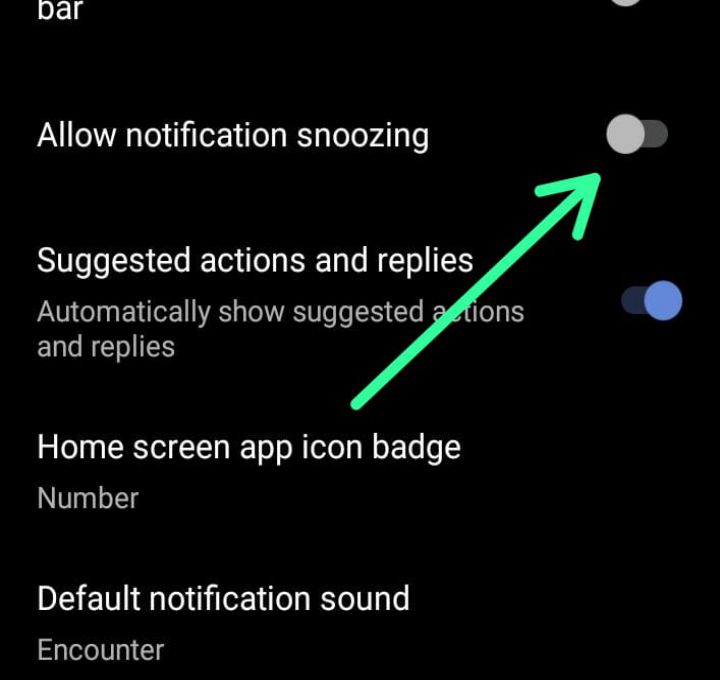
  • Toggle on the “Allow Notification Snoozing” option.
The Step-by-Step Guide to Setting Reminders on Your Android Phone for Notifications

Note: On certain devices, you may need to go to “Advanced Settings” to locate the “Show Snooze Button” option.

Using Notification Reminders

Now that you have enabled notification snoozing, you can use the feature easily. Follow these steps to set reminders for notifications on your Android device:

  • Begin by having an existing notification you want to be reminded of. If the notification is not expanded, either drag it down or tap the arrow icon on the right side to expand it.
  • In the bottom corner of the expanded notification, you will see a small clock or bell icon. Tap on it.

Different Devices, Different Options

The next step might vary depending on the Android device you own. Let’s explore the options for Google Pixel and Samsung Galaxy devices:

  • Google Pixel: By default, Google Pixel phones offer a snooze time of one hour. However, you can tap the down arrow to select a different time length that suits your needs.
  • Samsung Galaxy: You can choose the desired time length for the reminder immediately on Samsung Galaxy devices. Select the desired time and tap “Save.”

Receive Important Notifications Again

Once you have completed the steps above, the notification you snoozed will reappear after the specified time. Keep in mind that not all notifications offer this option, but most notifications do. Utilize this feature to ensure that you never miss important notifications again.

Conclusion

With the built-in feature of setting reminders for notifications on Android devices, you no longer need to rely on third-party apps. Whether you’re using a Samsung Galaxy, Google Pixel, or any other Android phone, getting reminders for notifications is now a seamless process. Enable the notification snoozing feature and follow the simple steps outlined above to make the most of this convenient feature and stay on top of your important notifications.


RELATED POSTS

Generative AI and Fair Compensation for Artists: The Call for Proper Authorization and Compensation

Building Equitable Products: Strategies for Inclusive Product Innovation

Blue Apron: From IPO to Acquisition by Wonder Group – A Journey of Growth and Transformation

ADVERTISEMENT
ShareTweetShareSend
Editorial Team

Editorial Team

Related Posts

Top Buzz Trends - Post Thumbnail
Tech

Generative AI and Fair Compensation for Artists: The Call for Proper Authorization and Compensation

October 1, 2023
Top Buzz Trends - Post Thumbnail
Tech

Building Equitable Products: Strategies for Inclusive Product Innovation

September 30, 2023
Top Buzz Trends - Post Thumbnail
Tech

Blue Apron: From IPO to Acquisition by Wonder Group – A Journey of Growth and Transformation

September 30, 2023
Top Buzz Trends - Post Thumbnail
Tech

The Intrigue Surrounding X’s Subscription Model: Lack of Clarity and Coordination Revealed in Interview

September 29, 2023
Tech

Is Your iPhone Compatible with iOS 17? Check Compatibility and Find Out!

September 29, 2023
Top Buzz Trends - Post Thumbnail
Tech

The Future of Artifact: Transforming into a Social News Experience

September 29, 2023

Popular - Posts

  • Top Buzz Trends - Post Thumbnail

    Starbreeze Resolves Server Issues for PayDay 3: Major Update and Commercial Activities Resume

    0 shares
    Share 0 Tweet 0
  • Bleach Brave Souls Update 1.43: Increased Maximum Player Rank, Battle Power, and More!

    0 shares
    Share 0 Tweet 0
  • Blue Origin and Sierra Space Partnership on Orbital Reef Space Station Faces Uncertainty

    0 shares
    Share 0 Tweet 0
  • Trending
  • Comments
  • Latest
Top Buzz Trends - Post Thumbnail

Starbreeze Resolves Server Issues for PayDay 3: Major Update and Commercial Activities Resume

October 2, 2023
Top Buzz Trends - Post Thumbnail

Bleach Brave Souls Update 1.43: Increased Maximum Player Rank, Battle Power, and More!

October 2, 2023
Top Buzz Trends - Post Thumbnail

Blue Origin and Sierra Space Partnership on Orbital Reef Space Station Faces Uncertainty

September 29, 2023
Enlisted Patch Notes 1.97 Update Today on June 2, 2022

Enlisted Patch Notes 1.97 Update Today on June 2, 2022

June 4, 2022
Top Buzz Trends - Post Thumbnail

Bleach Brave Souls Update 1.43: Increased Maximum Player Rank, Battle Power, and More!

October 2, 2023
Top Buzz Trends - Post Thumbnail

Starbreeze Resolves Server Issues for PayDay 3: Major Update and Commercial Activities Resume

October 2, 2023

Memory: A Promising Film from TIFF with Jessica Chastain and Peter Sarsgaard

October 2, 2023
Top Buzz Trends - Post Thumbnail

Scientists Win Nobel Prize for Groundbreaking Discoveries in mRNA Vaccines Against COVID-19

October 2, 2023
  • About Us
  • Contact Us
  • Privacy Policy
  • Disclaimer
  • Editorial Policy
  • Terms and Conditions
  • Use Of Cookies

Top Buzz Trends
Top Buzz Trends is not endorsed, moderated, owned by, or affiliated with TopBuzz or any of its partners in any capacity. Top Buzz Trends is an independent news website for Entertainment, Movies, TV Shows, Netflix, Games, and Gadgets, Software, Computers, Smartphones, and more. All promotional material including but not limited to trailers, images, and videos, are all copyrighted to their respective owners. TopBuzz is a registered trademark of ByteDance Ltd.
© Top Buzz Trends - All Rights Reserved.

No Result
View All Result
  • Entertainment
  • Business
  • Gaming
  • Tech
  • Crypto
  • More
    • Netflix
    • Prime Video
    • Max
    • Celebrity News
    • Movies
    • TV Shows
    • Paramount+
    • Disney+
    • Hulu
    • Apple TV
    • Google TV
    • Politics
    • Sports

Top Buzz Trends
Top Buzz Trends is not endorsed, moderated, owned by, or affiliated with TopBuzz or any of its partners in any capacity. Top Buzz Trends is an independent news website for Entertainment, Movies, TV Shows, Netflix, Games, and Gadgets, Software, Computers, Smartphones, and more. All promotional material including but not limited to trailers, images, and videos, are all copyrighted to their respective owners. TopBuzz is a registered trademark of ByteDance Ltd.
© Top Buzz Trends - All Rights Reserved.

This website uses cookies. By continuing to use this website you are giving consent to cookies being used. Visit our Privacy and Cookie Policy.
Go to mobile version